
How to Check Nol Card Travel History Online in Dubai
Checking your NOL card travel history helps you review recent journeys, fare deductions, and other transactions linked to your card. The most reliable method is to use the RTA’s NOL Card Transaction History service with a personal or registered NOL card.
RTA allows eligible cardholders to view one month of transaction history. This is different from a simple NOL balance check, which only shows the amount currently available on the card.
How to Check NOL Card Travel History
To check NOL card travel history online:
- Open the RTA NOL services page.
- Select NOL Card Transaction History.
- Sign in with your UAE Pass or RTA account.
- Choose the personal or registered NOL card linked to your account.
- Open the transaction history section.
- Review your recent card transactions.
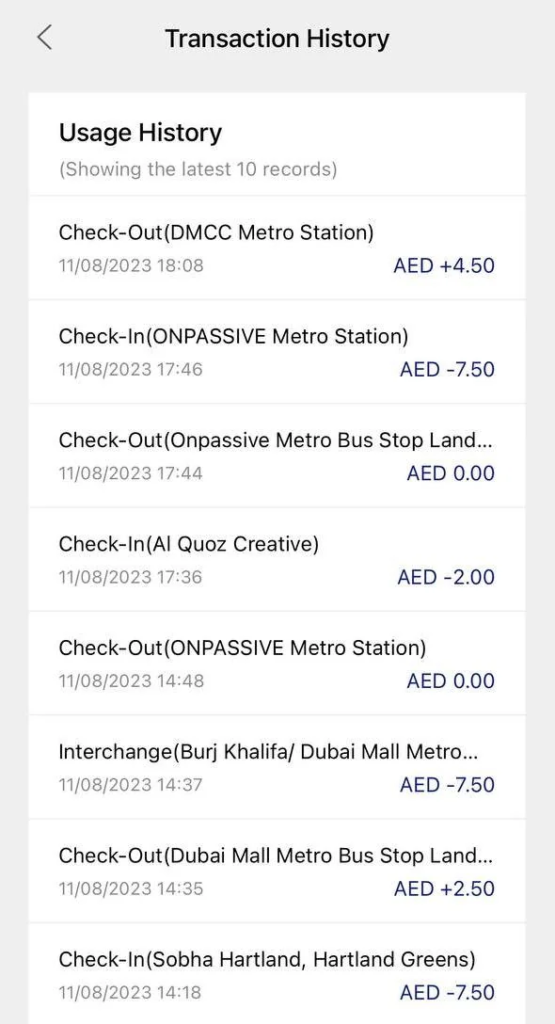
The exact menu names may vary slightly as RTA updates its website, but the transaction history service is available for personal NOL card records. RTA states that one month of transaction history can be viewed for eligible cards.
You can also visit the NOL Card Balance Check page to check your card balance quickly.
Ways to Check NOL Card Travel and Transaction History
Not every NOL service provides the same information. The table below shows which option is best for your situation.
| Method | What You Can Check | What You Need | Best For |
|---|---|---|---|
| RTA NOL Transaction History | Recent card transactions for up to one month | Personal or registered card and account access | Full recent history |
| NOL Pay App | Card balance, linked card details and NOL management | Smartphone, app and card | Mobile card management |
| RTA Balance Check | Current available balance only | NOL Tag ID | Quick balance enquiry |
| Metro Station Assistance | Help with card or fare problems | Physical NOL card | Disputed or unclear transactions |
The RTA website is the best option when your main goal is to check previous NOL transactions. The NOL Pay app is useful for managing your card, checking the balance, topping up, buying travel passes, and handling linked family cards.
How to Check NOL Card Travel History Online
The online RTA service is the most direct way to review recent NOL card activity. It is especially useful when you want to check a fare deduction without visiting a Metro station.
Step 1: Open the RTA NOL Services Section
Go to the NOL services area and look for NOL Card Transaction History.
Do not choose the standard balance-checking tool by mistake. The balance service only tells you how much money remains on the card, while transaction history provides a record of recent activity.
Step 2: Sign In to Your Account
Log in using the account option available to you, such as:
- UAE Pass
- RTA account credentials
Using UAE Pass is usually the simplest option for people who already use Dubai government digital services.
Step 3: Select Your NOL Card
Choose the personal or registered NOL card connected to your account.
Check the NOL Tag ID carefully if you manage more than one card. Selecting the wrong card is a common reason users think a journey or fare deduction is missing.
Step 4: Open the Transaction History
Find the transaction or card history section in your account.
Your available record should show recent NOL card activity. RTA describes this service as a brief summary of personal NOL card transactions through its channels.
Step 5: Review the Transaction Details
Check the available details against your own journeys and payments.
Depending on the transaction type and information displayed, the record may help you identify:
- the transaction date
- the type of NOL activity
- a fare or payment amount
- a top-up or balance-related transaction
- other recent card usage
The information shown can differ by transaction type, so do not expect every entry to contain full route details.
How Far Back Can You Check NOL Card Travel History?
RTA states that users of eligible personal or registered NOL cards can view one month of transaction history. This is the clearest current period to use when checking recent card activity.
This means you should check a suspicious fare or a missing transaction as soon as possible. Older journeys may no longer appear once they fall outside the available history period.
Be careful with websites claiming that every user can automatically view 90 days, several months, or a complete lifetime history. The available period can depend on the card and service, and the official personal-card information currently specifies one month.
What Does NOL Card Travel History Show?
NOL card travel history is a record of recent activity connected to your card. It can help you understand when and how your stored balance was used.
The transaction summary may help you review activity such as:
- public transport fare deductions
- card top-ups
- other NOL card transactions
- recent account-linked card activity
The exact level of detail may vary. A transaction record should not always be expected to show a complete journey map with every station, gate, stop, and route.
NOL Travel History vs NOL Transaction History
Many people search for NOL card travel history, but RTA refers to the service as NOL Card Transaction History.
The difference is simple:
| Record Type | What It Means |
|---|---|
| Travel History | Journeys and transport-related fare deductions |
| Transaction History | Broader activity connected to the NOL card |
| Balance History | Changes that affected the stored card value |
| Recharge History | Top-ups added to the card |
| Current Balance | The amount available to spend now |
Travel history is therefore part of the wider transaction record. A single NOL card can be used for more than one type of activity, so not every transaction in the history will necessarily represent a Metro or bus journey.
NOL Card Travel History Is Not the Same as a Balance Check
This is one of the most common points of confusion.
A NOL balance check tells you how much credit is currently available. It does not provide a list of previous trips, deductions, or top-ups.
For example, if your NOL card shows AED 22.50, that number alone cannot explain:
- when the last fare was deducted
- how much a previous trip cost
- when the card was recharged
- which recent transaction reduced the balance
You need the transaction history service to investigate recent card activity.
Can You Check NOL Card Travel History With a Tag ID Only?
A NOL Tag ID can be used for several card services, including basic balance-related enquiries. However, entering a Tag ID into the public balance checker is not the same as opening a full travel or transaction record.
Full recent transaction history is associated with personal or registered NOL card services. RTA also states that registering an anonymous Silver or Gold card gives access to broader NOL services.
For privacy and account security, you should not assume that anyone with a card number can view a complete personal travel record.
Where Is the NOL Tag ID?
The NOL Tag ID is the identification number associated with your card. You may need it when checking or managing NOL services.
Look carefully at the information printed on your physical NOL card. Enter the Tag ID exactly as shown and avoid adding spaces or confusing similar-looking numbers.
Do not rely on a random fixed digit count mentioned by unofficial guides. Different card versions and user interfaces can create confusion, so the safest approach is to use the complete Tag ID printed on your own card.
How to Use the NOL Pay App for Card Management
NOL Pay is the official RTA app focused on NOL card services. It can be used for card management, instant balance checks, top-ups, travel passes, family card management, and other supported services.
To manage your card:
- Open the NOL Pay app.
- Sign in to your account.
- Use UAE Pass where required.
- Select a linked NOL card or scan the physical card when supported.
- Review the available card details and services.
NFC-compatible phones can support certain card-reading and activation functions. The exact features available may depend on the phone, operating system, card type, and whether the card is linked to the account.
When Should You Use the RTA Website Instead?
Use the RTA transaction history service when you specifically need the official recent transaction record.
Use NOL Pay when you mainly want to:
- check the current balance
- top up a card
- manage linked cards
- buy or renew a travel pass
- use supported NFC functions
This distinction saves time because a balance screen does not replace a transaction history report.
Can You Check NOL Card Travel History at a Metro Station?
A Metro station can be useful when you cannot access your card online or need help understanding a possible fare problem.
Take the physical NOL card with you and ask for assistance if:
- a fare appears incorrect
- the card is not working
- a recent journey caused an unexpected balance change
- your online account is not showing the card correctly
Do not assume that every machine will provide the same full one-month transaction history available through an account-linked online service. Station assistance is most useful for card problems and unresolved fare questions.
Can You Check Travel History for an Anonymous NOL Card?
Full transaction-history access is more limited for an anonymous NOL card than for a personal or registered card.
RTA allows anonymous Silver and Gold cards to be registered so users can access broader NOL services. Personal and registered cards also provide better account-based management and protection than an unregistered card.
If checking past transactions is important to you, registering an eligible card is the better long-term option.
What Is the Difference Between an Anonymous and Registered NOL Card?
| Feature | Anonymous Card | Registered or Personal Card |
|---|---|---|
| Quick balance check | Yes | Yes |
| Linked to an account | No | Yes |
| One-month transaction history | Limited or unavailable | Available for eligible cards |
| Better card management | Limited | Yes |
| Easier identification of the correct card | No | Yes |
| Stronger protection if problems occur | Limited | Better |
An anonymous card is convenient for basic travel, but a registered or personal card is more suitable for regular commuters who want better access to card services and recent transaction records.
Why Is My Recent NOL Trip Not Showing?
A missing journey does not always mean the fare was never recorded. Several issues can make a recent trip difficult to find.
The Transaction Has Not Updated Yet
A recent activity may not appear immediately in the section you are checking.
Review the history again later before assuming the record is permanently missing.
You Selected the Wrong NOL Card
People who own several NOL cards can easily open the history for the wrong one.
Compare the card in your hand with the card selected in your account.
Your Card Is Not Registered
An anonymous card may not provide the same account-based history access as a registered or personal card.
A public balance enquiry will not give you the same information as the transaction history service.
The Journey Is Older Than the Available Period
The current official period for eligible personal-card transaction history is one month.
A much older trip may no longer appear in the recent record.
You Are Looking at the Balance Page
The balance page only shows the current amount.
Return to the NOL Card Transaction History service if you need previous transactions.
There Was a Tap-In or Tap-Out Issue
An incomplete or unusual journey can create a fare result you were not expecting.
Review the available transaction details and seek RTA assistance if the charge still appears incorrect.
What to Do If a NOL Fare Looks Wrong
An unexpected deduction should be checked carefully before you report it.
Follow these steps:
- Check the recent transaction history.
- Confirm the date and approximate time of the journey.
- Check which NOL card you used.
- Note the transport mode, such as Metro, bus, or tram.
- Record the amount you believe was deducted.
- Think about any missed tap-in or tap-out.
- Contact RTA support if the transaction still appears incorrect.
Having these details ready makes it easier to explain the problem clearly.
Common NOL Travel History Problems and Solutions
| Problem | Likely Cause | What to Do |
|---|---|---|
| No history appears | Wrong service or unregistered card | Use the transaction history service and check card status |
| Recent trip is missing | Record may not have updated | Check again later |
| Old trip cannot be found | Outside the available period | Review records within one month |
| Balance changed unexpectedly | Fare, top-up or other transaction | Compare with recent transactions |
| Wrong card history appears | Multiple cards linked | Check the selected Tag ID |
| App does not read card | NFC or device compatibility issue | Check NFC settings or use the website |
| Fare seems too high | Journey or tap issue | Record details and seek RTA assistance |
Can You Download or Keep Your NOL Travel History?
Available options can change depending on the RTA account interface.
When reviewing an important transaction, keep your own record by noting:
- transaction date
- transaction time, if displayed
- amount
- transaction type
- NOL card used
- reason you believe the charge is incorrect
A screenshot can also help preserve the information while it remains inside the available history period. Avoid sharing screenshots publicly if they contain account or card information.
Can You Check Another Person’s NOL Card Travel History?
A complete personal transaction record should be treated as private information.
Do not try to access another person’s travel history without permission. Account-linked card services are designed to protect personal card information and should only be used through authorised profiles.
Parents or guardians managing family cards should use the appropriate official account and card-management options. NOL Pay includes supported features for managing family NOL cards.
Can You Check Travel History After Losing a NOL Card?
Your chances of managing the problem are better if the lost card was personal or registered.
Sign in to the account linked to the card and check the services available for that card. Review recent transactions as soon as possible because the standard available history period for eligible cards is limited to one month.
An anonymous card is harder to manage after loss because it is not linked to your identity in the same way. This is one reason regular Dubai commuters may benefit from registering an eligible Silver or Gold card or using a personal NOL card.
Practical Tips for Checking NOL Transactions
Check the card soon after noticing an unexpected balance change. Waiting too long can make it harder to find the transaction within the available history period.
Also:
- keep track of which NOL card you use most often
- register an eligible card if you need account-based services
- do not confuse balance checking with transaction history
- compare the exact card before reviewing linked records
- never share your NOL PIN with another person
- keep important transaction details until a fare issue is resolved
RTA warns users to keep their card PIN confidential and link NOL cards only to authorised profiles.
Frequently Asked Questions
How can I check my NOL card travel history online?
To learn how to check NOL card travel history online, open the RTA NOL services area, select NOL Card Transaction History, sign in with UAE Pass or your RTA account, and choose the linked personal or registered card. You can then review available recent transactions for that card.
How far back can I see my NOL card transaction history?
RTA currently states that eligible personal or registered NOL card users can view one month of transaction history. When learning how to check NOL card travel history, review suspicious fares promptly because journeys older than the available period may no longer appear in your recent account record.
Can I check NOL card travel history without logging in?
A public NOL balance check may work without opening a full account, but it only shows the available balance. For how to check NOL card travel history in detail, use the account-linked transaction history service with a personal or registered card and the required sign-in method.
Why is my recent NOL trip not showing?
When using how to check NOL card travel history methods, a missing trip can result from selecting the wrong linked card, checking too soon, using an anonymous card, or looking at the balance page instead of transaction history. Check the Tag ID and review the correct service again.
Can I check travel history if my NOL card is lost?
How to check NOL card travel history after losing a card depends mainly on whether it was personal or registered. Sign in to the account linked to the card and review recent transactions. Anonymous cards are harder to manage because they are not connected to your identity or account.
What information appears in NOL card transaction history?
When following how to check NOL card travel history steps, the available record may show recent card activity such as transaction dates, transaction types and amounts. The exact details can vary, and not every entry should be expected to display a complete journey route, station sequence or travel map.
Is checking NOL card travel history free?
There is no separate charge for using the normal online service to review available NOL card transactions. To follow how to check NOL card travel history correctly, use the official transaction-history option for an eligible linked card rather than paying a third party to access basic card information.